1
2# SimpleChat
3
4by Humans for All.
5
6## quickstart
7
8To run from the build dir
9
10bin/llama-server -m path/model.gguf --path ../tools/server/public_simplechat
11
12Continue reading for the details.
13
14## overview
15
16This simple web frontend, allows triggering/testing the server's /completions or /chat/completions endpoints
17in a simple way with minimal code from a common code base. Inturn additionally it tries to allow single or
18multiple independent back and forth chatting to an extent, with the ai llm model at a basic level, with their
19own system prompts.
20
21This allows seeing the generated text / ai-model response in oneshot at the end, after it is fully generated,
22or potentially as it is being generated, in a streamed manner from the server/ai-model.
23
24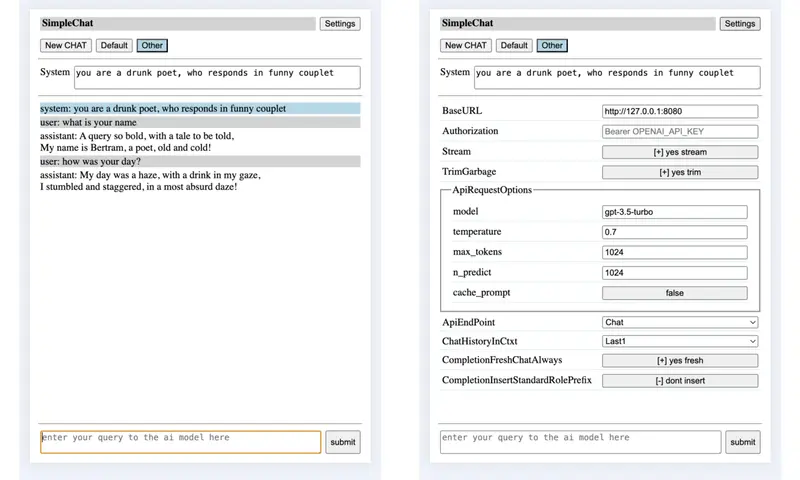
25
26Auto saves the chat session locally as and when the chat is progressing and inturn at a later time when you
27open SimpleChat, option is provided to restore the old chat session, if a matching one exists.
28
29The UI follows a responsive web design so that the layout can adapt to available display space in a usable
30enough manner, in general.
31
32Allows developer/end-user to control some of the behaviour by updating gMe members from browser's devel-tool
33console. Parallely some of the directly useful to end-user settings can also be changed using the provided
34settings ui.
35
36NOTE: Current web service api doesnt expose the model context length directly, so client logic doesnt provide
37any adaptive culling of old messages nor of replacing them with summary of their content etal. However there
38is a optional sliding window based chat logic, which provides a simple minded culling of old messages from
39the chat history before sending to the ai model.
40
41NOTE: Wrt options sent with the request, it mainly sets temperature, max_tokens and optionaly stream for now.
42However if someone wants they can update the js file or equivalent member in gMe as needed.
43
44NOTE: One may be able to use this to chat with openai api web-service /chat/completions endpoint, in a very
45limited / minimal way. One will need to set model, openai url and authorization bearer key in settings ui.
46
47
48## usage
49
50One could run this web frontend directly using server itself or if anyone is thinking of adding a built in web
51frontend to configure the server over http(s) or so, then run this web frontend using something like python's
52http module.
53
54### running using tools/server
55
56./llama-server -m path/model.gguf --path tools/server/public_simplechat [--port PORT]
57
58### running using python3's server module
59
60first run tools/server
61* ./llama-server -m path/model.gguf
62
63next run this web front end in tools/server/public_simplechat
64* cd ../tools/server/public_simplechat
65* python3 -m http.server PORT
66
67### using the front end
68
69Open this simple web front end from your local browser
70
71* http://127.0.0.1:PORT/index.html
72
73Once inside
74
75* If you want to, you can change many of the default global settings
76 * the base url (ie ip addr / domain name, port)
77 * chat (default) vs completion mode
78 * try trim garbage in response or not
79 * amount of chat history in the context sent to server/ai-model
80 * oneshot or streamed mode.
81
82* In completion mode
83 * one normally doesnt use a system prompt in completion mode.
84 * logic by default doesnt insert any role specific "ROLE: " prefix wrt each role's message.
85 If the model requires any prefix wrt user role messages, then the end user has to
86 explicitly add the needed prefix, when they enter their chat message.
87 Similarly if the model requires any prefix to trigger assistant/ai-model response,
88 then the end user needs to enter the same.
89 This keeps the logic simple, while still giving flexibility to the end user to
90 manage any templating/tagging requirement wrt their messages to the model.
91 * the logic doesnt insert newline at the begining and end wrt the prompt message generated.
92 However if the chat being sent to /completions end point has more than one role's message,
93 then insert newline when moving from one role's message to the next role's message, so
94 that it can be clearly identified/distinguished.
95 * given that /completions endpoint normally doesnt add additional chat-templating of its
96 own, the above ensures that end user can create a custom single/multi message combo with
97 any tags/special-tokens related chat templating to test out model handshake. Or enduser
98 can use it just for normal completion related/based query.
99
100* If you want to provide a system prompt, then ideally enter it first, before entering any user query.
101 Normally Completion mode doesnt need system prompt, while Chat mode can generate better/interesting
102 responses with a suitable system prompt.
103 * if chat.add_system_begin is used
104 * you cant change the system prompt, after it is has been submitted once along with user query.
105 * you cant set a system prompt, after you have submitted any user query
106 * if chat.add_system_anytime is used
107 * one can change the system prompt any time during chat, by changing the contents of system prompt.
108 * inturn the updated/changed system prompt will be inserted into the chat session.
109 * this allows for the subsequent user chatting to be driven by the new system prompt set above.
110
111* Enter your query and either press enter or click on the submit button.
112 If you want to insert enter (\n) as part of your chat/query to ai model, use shift+enter.
113
114* Wait for the logic to communicate with the server and get the response.
115 * the user is not allowed to enter any fresh query during this time.
116 * the user input box will be disabled and a working message will be shown in it.
117 * if trim garbage is enabled, the logic will try to trim repeating text kind of garbage to some extent.
118
119* just refresh the page, to reset wrt the chat history and or system prompt and start afresh.
120
121* Using NewChat one can start independent chat sessions.
122 * two independent chat sessions are setup by default.
123
124* When you want to print, switching ChatHistoryInCtxt to Full and clicking on the chat session button of
125 interest, will display the full chat history till then wrt same, if you want full history for printing.
126
127
128## Devel note
129
130### Reason behind this
131
132The idea is to be easy enough to use for basic purposes, while also being simple and easily discernable
133by developers who may not be from web frontend background (so inturn may not be familiar with template /
134end-use-specific-language-extensions driven flows) so that they can use it to explore/experiment things.
135
136And given that the idea is also to help explore/experiment for developers, some flexibility is provided
137to change behaviour easily using the devel-tools/console or provided minimal settings ui (wrt few aspects).
138Skeletal logic has been implemented to explore some of the end points and ideas/implications around them.
139
140
141### General
142
143Me/gMe consolidates the settings which control the behaviour into one object.
144One can see the current settings, as well as change/update them using browsers devel-tool/console.
145It is attached to the document object. Some of these can also be updated using the Settings UI.
146
147 baseURL - the domain-name/ip-address and inturn the port to send the request.
148
149 bStream - control between oneshot-at-end and live-stream-as-its-generated collating and showing
150 of the generated response.
151
152 the logic assumes that the text sent from the server follows utf-8 encoding.
153
154 in streaming mode - if there is any exception, the logic traps the same and tries to ensure
155 that text generated till then is not lost.
156
157 if a very long text is being generated, which leads to no user interaction for sometime and
158 inturn the machine goes into power saving mode or so, the platform may stop network connection,
159 leading to exception.
160
161 apiEP - select between /completions and /chat/completions endpoint provided by the server/ai-model.
162
163 bCompletionFreshChatAlways - whether Completion mode collates complete/sliding-window history when
164 communicating with the server or only sends the latest user query/message.
165
166 bCompletionInsertStandardRolePrefix - whether Completion mode inserts role related prefix wrt the
167 messages that get inserted into prompt field wrt /Completion endpoint.
168
169 bTrimGarbage - whether garbage repeatation at the end of the generated ai response, should be
170 trimmed or left as is. If enabled, it will be trimmed so that it wont be sent back as part of
171 subsequent chat history. At the same time the actual trimmed text is shown to the user, once
172 when it was generated, so user can check if any useful info/data was there in the response.
173
174 One may be able to request the ai-model to continue (wrt the last response) (if chat-history
175 is enabled as part of the chat-history-in-context setting), and chances are the ai-model will
176 continue starting from the trimmed part, thus allows long response to be recovered/continued
177 indirectly, in many cases.
178
179 The histogram/freq based trimming logic is currently tuned for english language wrt its
180 is-it-a-alpabetic|numeral-char regex match logic.
181
182 apiRequestOptions - maintains the list of options/fields to send along with api request,
183 irrespective of whether /chat/completions or /completions endpoint.
184
185 If you want to add additional options/fields to send to the server/ai-model, and or
186 modify the existing options value or remove them, for now you can update this global var
187 using browser's development-tools/console.
188
189 For string, numeric and boolean fields in apiRequestOptions, including even those added by a
190 user at runtime by directly modifying gMe.apiRequestOptions, setting ui entries will be auto
191 created.
192
193 cache_prompt option supported by example/server is allowed to be controlled by user, so that
194 any caching supported wrt system-prompt and chat history, if usable can get used. When chat
195 history sliding window is enabled, cache_prompt logic may or may not kick in at the backend
196 wrt same, based on aspects related to model, positional encoding, attention mechanism etal.
197 However system prompt should ideally get the benefit of caching.
198
199 headers - maintains the list of http headers sent when request is made to the server. By default
200 Content-Type is set to application/json. Additionally Authorization entry is provided, which can
201 be set if needed using the settings ui.
202
203 iRecentUserMsgCnt - a simple minded SlidingWindow to limit context window load at Ai Model end.
204 This is disabled by default. However if enabled, then in addition to latest system message, only
205 the last/latest iRecentUserMsgCnt user messages after the latest system prompt and its responses
206 from the ai model will be sent to the ai-model, when querying for a new response. IE if enabled,
207 only user messages after the latest system message/prompt will be considered.
208
209 This specified sliding window user message count also includes the latest user query.
210 <0 : Send entire chat history to server
211 0 : Send only the system message if any to the server
212 >0 : Send the latest chat history from the latest system prompt, limited to specified cnt.
213
214
215By using gMe's iRecentUserMsgCnt and apiRequestOptions.max_tokens/n_predict one can try to control
216the implications of loading of the ai-model's context window by chat history, wrt chat response to
217some extent in a simple crude way. You may also want to control the context size enabled when the
218server loads ai-model, on the server end.
219
220
221Sometimes the browser may be stuborn with caching of the file, so your updates to html/css/js
222may not be visible. Also remember that just refreshing/reloading page in browser or for that
223matter clearing site data, dont directly override site caching in all cases. Worst case you may
224have to change port. Or in dev tools of browser, you may be able to disable caching fully.
225
226
227Currently the server to communicate with is maintained globally and not as part of a specific
228chat session. So if one changes the server ip/url in setting, then all chat sessions will auto
229switch to this new server, when you try using those sessions.
230
231
232By switching between chat.add_system_begin/anytime, one can control whether one can change
233the system prompt, anytime during the conversation or only at the beginning.
234
235
236### Default setup
237
238By default things are setup to try and make the user experience a bit better, if possible.
239However a developer when testing the server of ai-model may want to change these value.
240
241Using iRecentUserMsgCnt reduce chat history context sent to the server/ai-model to be
242just the system-prompt, prev-user-request-and-ai-response and cur-user-request, instead of
243full chat history. This way if there is any response with garbage/repeatation, it doesnt
244mess with things beyond the next question/request/query, in some ways. The trim garbage
245option also tries to help avoid issues with garbage in the context to an extent.
246
247Set max_tokens to 1024, so that a relatively large previous reponse doesnt eat up the space
248available wrt next query-response. However dont forget that the server when started should
249also be started with a model context size of 1k or more, to be on safe side.
250
251 The /completions endpoint of tools/server doesnt take max_tokens, instead it takes the
252 internal n_predict, for now add the same here on the client side, maybe later add max_tokens
253 to /completions endpoint handling code on server side.
254
255NOTE: One may want to experiment with frequency/presence penalty fields in apiRequestOptions
256wrt the set of fields sent to server along with the user query, to check how the model behaves
257wrt repeatations in general in the generated text response.
258
259A end-user can change these behaviour by editing gMe from browser's devel-tool/console or by
260using the provided settings ui (for settings exposed through the ui).
261
262
263### OpenAi / Equivalent API WebService
264
265One may be abe to handshake with OpenAI/Equivalent api web service's /chat/completions endpoint
266for a minimal chatting experimentation by setting the below.
267
268* the baseUrl in settings ui
269 * https://api.openai.com/v1 or similar
270
271* Wrt request body - gMe.apiRequestOptions
272 * model (settings ui)
273 * any additional fields if required in future
274
275* Wrt request headers - gMe.headers
276 * Authorization (available through settings ui)
277 * Bearer THE_OPENAI_API_KEY
278 * any additional optional header entries like "OpenAI-Organization", "OpenAI-Project" or so
279
280NOTE: Not tested, as there is no free tier api testing available. However logically this might
281work.
282
283
284## At the end
285
286Also a thank you to all open source and open model developers, who strive for the common good.